


ESL 2500 Main board
$249.95
ESL-2500 Main board
Out of stock

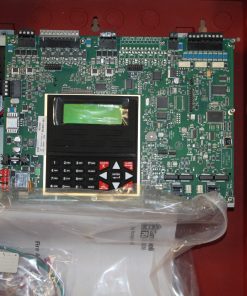
ESL 2500 Mainboard. Refurbished, fully functional board without metal box/cabinet.
THE KEYPAD KEYS
MENU KEY. Used to enter the programming mode.
SYSTEM RESET KEY. Resets the system if the system is in alarm or trouble and forces a battery test. The proper passcode must b e entered.
ALARM SILENCE KEY. Silences alarms when the proper passcode i s entered.
TROUBLE SILENCE KEY. Silences all system troubles when the proper passcode i s entered.
PROGRAMMING KEYS. We used the programming mode for menu and data entry scrolling and passcode entry.
THE KEYPAD DISPLAY. After four minutes of no keypresses, the keypad display will dim and go into screen saver mode. Press any key to turn the display back ON.
The ESL Fire Alarm Control Panel (FACP) uses two passcode levels: technician and user. Each passcode is four digits long. The user passcode allows resetting and silencing the FACP and programming of a limited number of items. The technician passcode allows complete programming of the FACP.
If a zone causes an alarm, the system status i s displayed on the first line. The status of zones in alarm and trouble are displayed on the second line. The top line scrolls all existing system conditions. The second line scrolls the status of all existing systems and zone conditions. Multiple system and zone conditions are scrolled alternately on the display’s second line. For complete zone or system status details, view the Event Log
| Weight | 2 lbs |
|---|---|
| Dimensions | 10 × 8 × 3 in |
Vendor Information
- Store Name: Jacksonville
- Vendor: Jacksonville
-
Address:
1981 Wells Rd
Orange Park, FL 32073 - No ratings found yet!
Related products
Expansion Card
Fire Alarm Panel

Fire Alarm Panel

Fire Alarm Panel
Fire Alarm Panel
Fire Alarm Panel

Expansion Card

Fire Alarm Panel